Sprites
...of the text variety
This site is hosted on fly.io
It's pretty ok.
I have some gripes around the ux for it, but the cli tooling tends to work and the product overall requires less insanity to get simple things up and running.
The people there have somewhat recently launched a project called sprites.dev
It's sold as stateful sandboxes to safely execute code. Code submitted by users or ai or any other type of miscreant that you wouldn't trust to execute code on a machine you paid money for or invested time into setting up.
Behind the scenes it appears to be firecracker vms with a simple http api on top for interacting with the vm's internals.
org-mode source blocks
org-mode allows working with source code inside special tags.
When running in emacs you can create a source block, write some code in it, and then execute it in the document.
The code in the block runs on your machine and any output it generated can be rendered inside the document based you are editing.
If you are familiar with swift playgrounds or jupyter notebooks this won't seem foreign to you.
Since orgmode.dev is a web app and not actually running in emacs this presents a challenge that I hope sprites.dev can neatly solve.
The backend of this site will create a sprite per user that you can use to execute code for any documents you create on the platform.
Examples
Below are some example snippets showing some simple things that can be done.
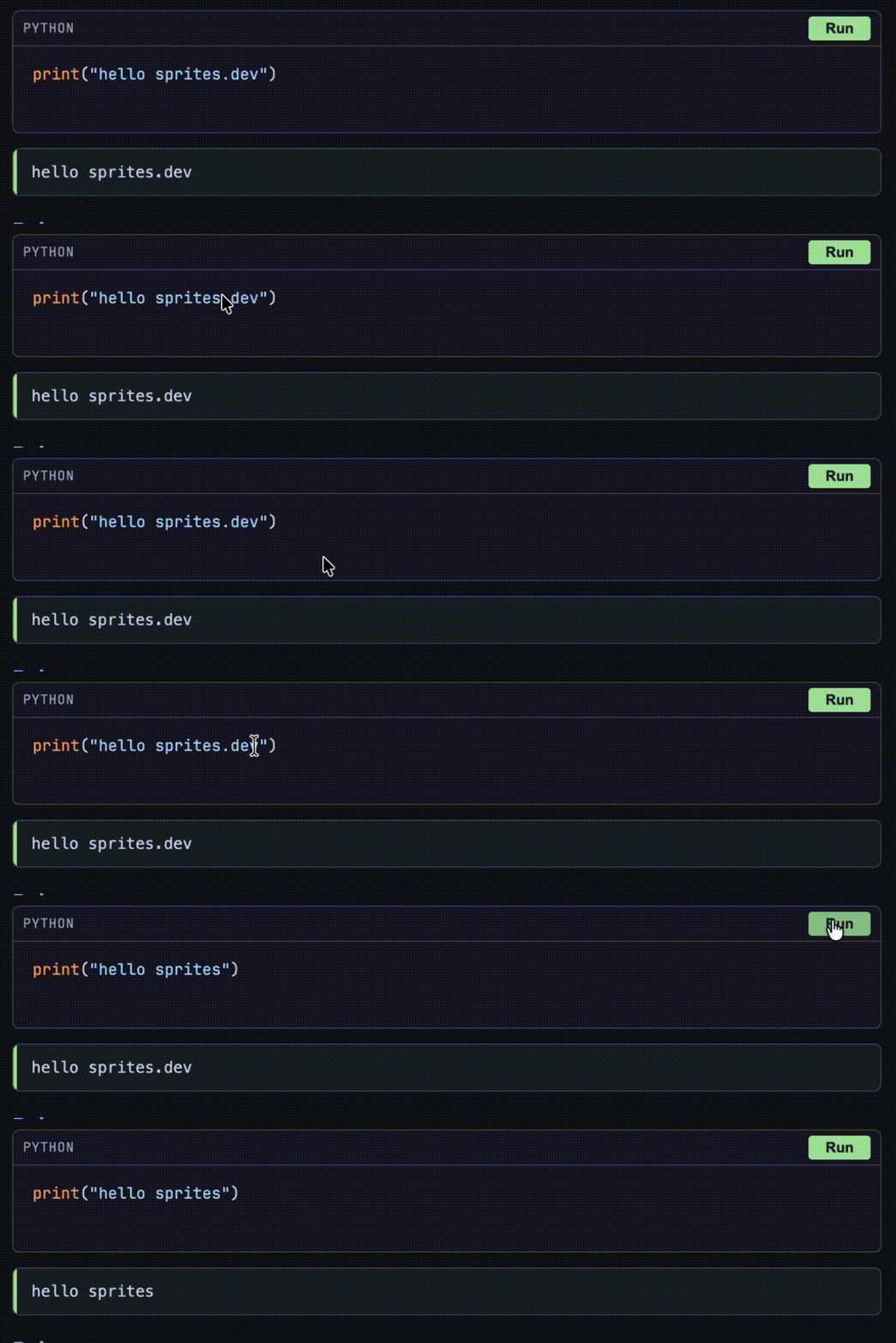
If you're logged into orgmode.dev, you'll see a Run button that will execute the code in the block
It looks like this:
If you want to see the source of this document, just add .org onto the end of the url.
Or just click this if you don't wanna do that.
Python
print("hello sprites")
hello sprites
Ruby
print "hello orgmode.dev"
hello orgmode.dev
Bash
ls -lah
total 48K
drwxr-xr-x 1 sprite sprite 4.0K Feb 19 18:12 .
drwxr-xr-x 1 sprite sprite 4.0K Feb 19 18:12 ..
-rw-r--r-- 1 sprite sprite  750 Feb 19 17:57 .bashrc
drwxr-xr-x 3 sprite sprite 4.0K Feb 19 17:57 .claude
drwxr-xr-x 3 sprite sprite 4.0K Feb 19 17:57 .codex
drwxr-xr-x 4 sprite sprite 4.0K Feb 19 17:57 .config
drwxr-xr-x 4 sprite sprite 4.0K Feb 19 17:57 .cursor
drwxr-xr-x 3 sprite sprite 4.0K Feb 19 17:57 .gemini
-rw-r--r-- 1 sprite sprite   89 Feb 19 17:57 .gitconfig
drwxr-xr-x 6 sprite sprite 4.0K Feb 19 18:11 .local
-rw-r--r-- 1 sprite sprite    0 Feb 19 17:58 .sudo_as_admin_successful
-rw-r--r-- 1 sprite sprite  383 Feb 19 17:57 .tcshrc
-rw-r--r-- 1 sprite sprite 1.1K Feb 19 17:57 .zshrc
Beyond "Hello World"
The above are pretty simple examples of what this site can do. To summarize we can:
Create source blocks using snippets by typing
<s-Tabto create a blockEnter some code in whatever language we pick for the block - highlighting gets applied to rendered output
We can execute the code in a sprites.dev vm and pipe the result back into the document we're editing.
Using what we already have here are some slightly more impressive demo
Mandlebrot set (Python)
# Mandelbrot set in ASCII
for y in range(-15, 15):
  row = ""
  for x in range(-40, 20):
    c = complex(x/15, y/15)
    z = 0
    for i in range(30):
      z = z*z + c
      if abs(z) > 2: break
    row += " .:-=+*#%@"[min(i, 9)]
  print(row)
               ...::::::::::::-----==*@@@----:::............
              ...::::::::::::-----==+#@@*=----:::...........
             ...::::::::::::-----==+%@@@%+==--::::..........
             ..:::::::::::------=++*@@@@@*===--::::.........
             .:::::::::::-----=++**#@@@@@#*++=--::::........
            .:::::::::::----==+@@%@@@@@@@@@#*#+-:::::.......
            .::::::::::---===+*@@@@@@@@@@@@@@@@=-::::.......
            :::::::::--=====++#@@@@@@@@@@@@@@@#=-:::::......
           .:::::::--======++#@@@@@@@@@@@@@@@@*+--::::......
           .:::::--=+@*******%@@@@@@@@@@@@@@@@%#--::::......
           :::----==+@@@@@%#%@@@@@@@@@@@@@@@@@@#=-:::::.....
           :-----===*%@@@@@@@@@@@@@@@@@@@@@@@@@*=-:::::.....
           :----===+*@@@@@@@@@@@@@@@@@@@@@@@@@@+=--::::.....
           ----=++*@%@@@@@@@@@@@@@@@@@@@@@@@@@@+=--::::.....
           ===*++*%@@@@@@@@@@@@@@@@@@@@@@@@@@@*==--::::.....
          @@@@@@@@@@@@@@@@@@@@@@@@@@@@@@@@@@@%*==--:::::....
           ===*++*%@@@@@@@@@@@@@@@@@@@@@@@@@@@*==--::::.....
           ----=++*@%@@@@@@@@@@@@@@@@@@@@@@@@@@+=--::::.....
           :----===+*@@@@@@@@@@@@@@@@@@@@@@@@@@+=--::::.....
           :-----===*%@@@@@@@@@@@@@@@@@@@@@@@@@*=-:::::.....
           :::----==+@@@@@%#%@@@@@@@@@@@@@@@@@@#=-:::::.....
           .:::::--=+@*******%@@@@@@@@@@@@@@@@%#--::::......
           .:::::::--======++#@@@@@@@@@@@@@@@@*+--::::......
            :::::::::--=====++#@@@@@@@@@@@@@@@#=-:::::......
            .::::::::::---===+*@@@@@@@@@@@@@@@@=-::::.......
            .:::::::::::----==+@@%@@@@@@@@@#*#+-:::::.......
             .:::::::::::-----=++**#@@@@@#*++=--::::........
             ..:::::::::::------=++*@@@@@*===--::::.........
             ...::::::::::::-----==+%@@@%+==--::::..........
              ...::::::::::::-----==+#@@*=----:::...........
ASCII Bar Chart (Python)
data = {"Python": 85, "Rust": 72, "JS": 68, "Ruby": 45, "Bash": 30}
max_val = max(data.values())
for lang, val in sorted(data.items(), key=lambda x: -x[1]):
  bar = "█" * int(val / max_val * 4)
  print(f"{lang:>8} │{bar} {val}")
  Python │████ 85
    Rust │███ 72
      JS │███ 68
    Ruby │██ 45
    Bash │█ 30
System Introspection (Bash)
echo "=== Sprite Environment ==="
 uname -a
 echo "---"
 cat /etc/os-release 2>/dev/null | head -3
 echo "---"
 echo "CPU: $(nproc) cores"
 echo "Memory: $(free -h 2>/dev/null | awk '/Mem/{print $2}' || echo 'N/A')"
 echo "Disk: $(df -h / | awk 'NR==2{print $4}') free"
=== Sprite Environment ===
Linux org-editor-7aea4c5f-d3cf-4ebe-be5b-0559bedf38c3 6.12.47-fly #1 SMP PREEMPT_DYNAMIC Fri Feb 13 00:38:38 UTC 2026 x86_64 x86_64 x86_64 GNU/Linux
---
PRETTY_NAME="Ubuntu 25.04"
NAME="Ubuntu"
VERSION_ID="25.04"
---
CPU: 8 cores
Memory: 15Gi
Disk: 99G free
Better source block parsing
:exports code (should show code only, no results div)
print("you should see this code but no results area")
:exports results (should hide code, show only results after Run)
:exports none (should be completely invisible)
:exports both (default, same as no arg)
print("code AND results visible")
code AND results visible
:results output (default — escaped, pre-wrapped)
print("<b>this should be escaped</b>")
<b>this should be escaped</b>
:results output html (raw HTML rendering)
print("<h3 style='color: #89b4fa;'>Hello from Python!</h3>")
print("<ul><li>Item one</li><li>Item two</li></ul>")
Hello from Python!
- Item one
- Item two
:results output html (SVG)
print('<svg width="200" height="100" xmlns="http://www.w3.org/2000/svg">')
print('  <rect width="200" height="100" rx="15" fill="#313244"/>')
print('  <text x="100" y="55" text-anchor="middle" fill="#cdd6f4" font-size="16">SVG from Python</text>')
print('</svg>')
:results output table (TSV → table rendering)
print("Name\tAge\tCity")
print("Alice\t30\tSeattle")
print("Bob\t25\tPortland")
print("Carol\t35\tDenver")
| Name | Age | City |
|---|---|---|
| Alice | 30 | Seattle |
| Bob | 25 | Portland |
| Carol | 35 | Denver |
Python value (should print 3, no print() needed)
1 + 2
3
Python value with statements
xs = [1, 2, 3, 4, 5]
sum(x**2 for x in xs)
55
JavaScript value
[1, 2, 3].map(x => x * 10)
[
  10,
  20,
  30
]
Ruby value
(1..5).map { |n| n ** 2 }
1
4
9
16
25
Named data source
print("Hello, World!")
Hello, World!
Block that references the named block
print(f"Received: {msg}")
print(f"Length: {len(msg.strip())}")
Received: Hello, World!
Length: 13
Chained computation
print("1,2,3,4,5")
1,2,3,4,5
nums = [int(x) for x in data.strip().split(",")]
print(f"Sum: {sum(nums)}")
print(f"Mean: {sum(nums)/len(nums)}")
Sum: 15
Mean: 3.0
Value + HTML (return an SVG as value)
`<svg width="150" height="50" xmlns="http://www.w3.org/2000/svg">
  <circle cx="25" cy="25" r="20" fill="#f38ba8"/>
  <circle cx="75" cy="25" r="20" fill="#a6e3a1"/>
  <circle cx="125" cy="25" r="20" fill="#89b4fa"/>
</svg>`
Static results with :results html
print("<em>rendered as HTML</em>")